


Trulia: Homes For Sale & Rent
4.760.66K Reviews
App Specs
- Version
- 14.46.0
- Updated On
- License
- Free
- Downloads
- 10,000,000+
- Developer
- Trulia (Owned by ZillowGroup)
- Categories
- House & Home
- Platform
- Android, iOS
Screenshots

 Analysis by AppCompare
When I use a home-search app, I’m not only looking at listings. I’m also thinking about how much personal context I’m willing to share while exploring a move, and how much I can judge from a screen before visiting a place. Trulia: Homes For Sale & Rent is a free House & Home app from Trulia, and its focus is practical: browsing properties alongside details about the surrounding area. It has a 4.7 average from around 316,000 ratings, and it has been installed over 10 million times. That kind of reach makes it familiar to many people, but popularity alone doesn’t tell me whether it fits a particular search.
Trust starts with what you can actually assess
I find Trulia most useful when I treat it as a research companion rather than as a final authority on a home or neighborhood. A listing can help me decide what deserves a closer look; it cannot replace a visit, a conversation with people who live nearby, or careful checks before making a financial commitment. That distinction matters because property decisions are high-stakes, and a polished screen can make incomplete impressions feel more certain than they are.
The app’s neighborhood material can give a search more context, but I would use it to form questions rather than draw firm conclusions. If an area seems promising, I’d still check the parts of daily life that matter to me at different times and from more than one source. This is especially important when interpreting broad indicators such as schools or safety: they can help frame a comparison, but they don’t describe every street, household, or personal experience.
How I’d handle location and other sensitive moments
Location is an obvious point to think through in a property app. Searching by a place you enter yourself is a sensible option when I don’t want to begin with my current whereabouts; location-based browsing is convenient when I’m already in an area and want to inspect nearby homes. I’d choose the approach that suits the task rather than assume that one is necessary for every search. Before granting any device permission, I’d read the prompt and decide whether its benefit is worth it for me.
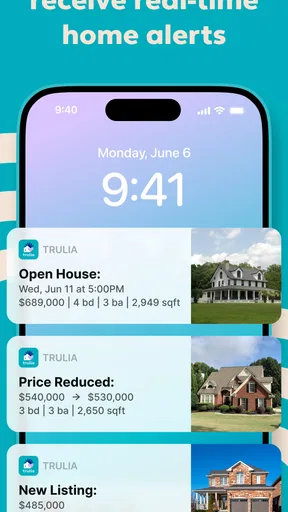
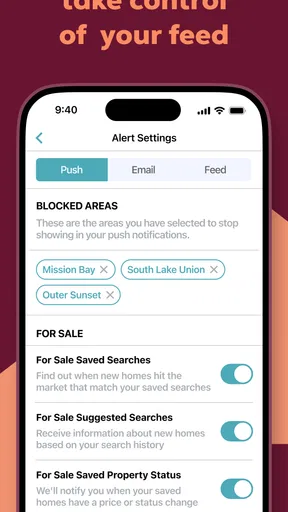
Alerts and saved listings also shape the experience. They can make a long search easier to manage, but notifications may reveal that I’m looking at homes if they appear on a shared screen. I’d keep alerts focused on a specific search and review my phone’s notification settings if privacy matters. For a casual browse, I can simply open the app when I choose instead of asking it to keep drawing my attention back.
Agency means setting the pace yourself
I like the basic idea of choosing what to follow: define a search, save properties that merit another look, and return to them when it suits me. That’s more manageable than trying to remember every address or relying on a stream of recommendations. Still, I wouldn’t let an alert set my schedule or push me into a rushed decision. A notification is a prompt to check a listing, not proof that it is the right home or that I need to act immediately.
For anyone who creates an account or uses community features, I’d take a moment to review the choices shown in the app and keep participation intentional. A question about a neighborhood can be useful, but I would avoid posting personal details that aren’t needed to get an answer. I also wouldn’t assume that comments from residents or professionals represent everyone’s experience. They are one perspective to weigh alongside my own research.
Worth Reading Before You Choose

Baby Panda World Brings Quick Play to Modern Phones, but Its Game Library Feels Busy

ESPN’s Live Game View Makes Following Close Games Easier

QuizzLand Review: A Good Fit for Short Trivia Breaks, Not Every Player

Basketball Stars: Multiplayer Is Fast, but Can It Recover When Matches Go Wrong?

WEBTOON Turns Phone Updates Into a Better Reading Routine

Link to Windows Runs on Shared Habits, Not Social Feeds
Who gets the most from this kind of search
Trulia makes the most sense for someone who is comparing areas as well as individual properties. A renter choosing between several neighborhoods, a first-time buyer learning what different parts of a city offer, or a person planning a move from elsewhere can use a map and local context to build a shortlist before arranging visits. It is less compelling if I already have a property and neighborhood in mind and only need formal transaction support, detailed financing advice, or a professional inspection.
I would also be cautious about relying on any single listing app as the complete picture. Different real-estate services can show different inventory, presentation, and local coverage, so a serious search benefits from checking more than one source. Trulia’s appeal is the combination of browsing homes and exploring their surroundings; another service may suit someone better if their priority is a particular agent relationship, a specific local listing source, or a narrower transaction task.
Discovering Your Dream Home
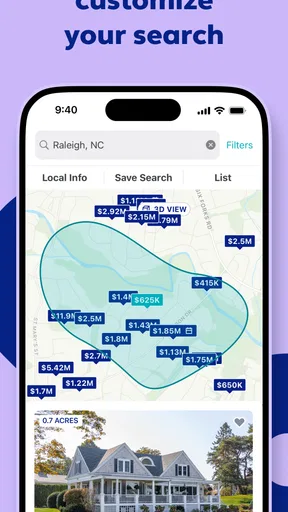
First off, let’s talk about the app’s user-friendly interface. As soon as you open it, Trulia: Homes For Sale & Rent greets you with a clean and intuitive design that’s super easy to navigate. You can start your search by entering a location or simply letting the app use your current location to show nearby listings. The search filters are like your personal genie, allowing you to specify everything from price range to the number of bedrooms and bathrooms.
But the magic doesn’t stop there. Trulia offers detailed listings with high-quality photos, so you can really get a feel for each property without having to leave your couch. Each listing includes key information like square footage, property type, and year built, along with a handy mortgage calculator to see if your dream home is financially feasible.
Exploring Neighborhood Insights
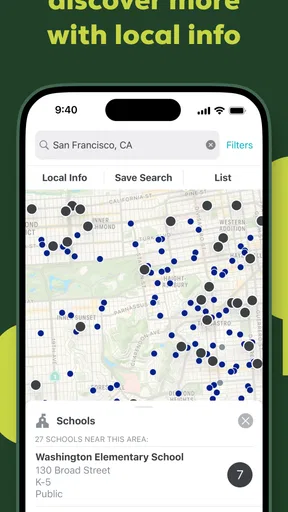
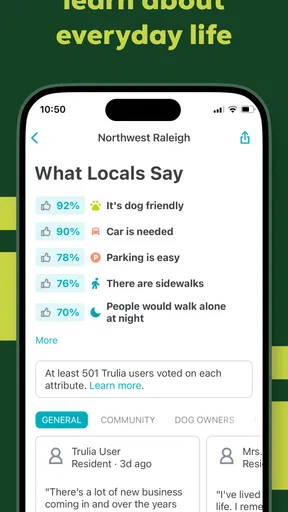
One of the standout features of Trulia is its comprehensive neighborhood insights. Ever wished you could get the inside scoop on a neighborhood before moving in? Trulia provides local insights that cover everything from crime rates to school ratings, and even reviews from actual residents. This feature is pure gold because it helps you make an informed decision about where you want to live.
The app also includes an interactive map that allows you to explore nearby amenities like grocery stores, parks, and public transport links. It’s a bit like having Google Maps meet a real estate agent, giving you a holistic view of what life might be like in your potential new digs.
Stay in the Loop with Alerts
Once you've dialed in your search criteria, you can set up alerts for new listings that match your preferences. This is a lifesaver for anyone who's been in the trenches of house hunting and knows how fast good properties can go. Trulia sends you notifications directly to your phone, ensuring you’re always in the loop and ready to pounce on the perfect pad.
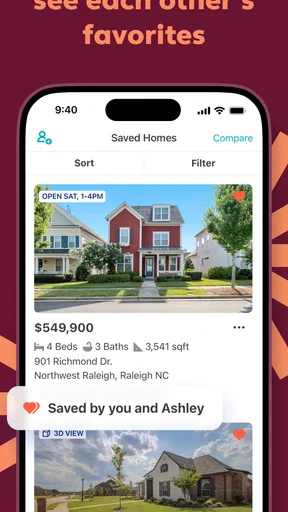
Plus, if you’re not quite ready to make a move, you can save your favorite properties for easy access later. This way, you can keep an eye on the market trends and maybe even catch a price drop on your dream home.
User Experience and Community Engagement
Engaging with other users on Trulia is another perk. The app’s community Q&A section lets you ask questions about specific neighborhoods or properties and get answers from locals or real estate professionals. It’s like having a built-in support network of people who are just as passionate about real estate as you are.
Moreover, the app performs smoothly without any noticeable glitches or lags, making for a seamless user experience. This is crucial when you’re on the hunt and need reliable information at your fingertips.
Making the information useful in real life
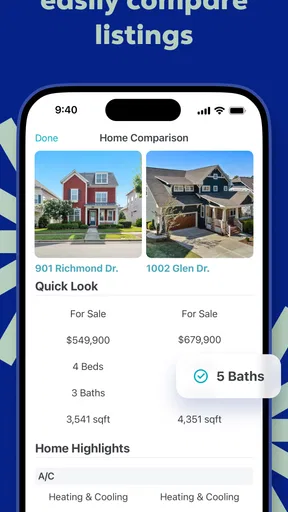
A practical way to use the app is to start broad, then narrow down only after you understand the trade-offs. For example, I might first compare several areas on the map, save a handful of listings that look plausible, and then revisit them with a short checklist: commute, nearby essentials, layout, and the questions I’d need answered in person. This avoids treating the first attractive photo as a decision and makes saved homes easier to compare for specific reasons.
For a renter with a busy week, a focused alert can help catch newly listed options without repeatedly running the same search. For a buyer, the calculator can serve as a quick reality check, but I’d regard it as a starting estimate, not a complete budget. I would separately consider expenses and terms that matter to my situation, then discuss financing with an appropriate professional before making plans around a number shown in an app.
There are also limits to what a map can tell me. A nearby park or transit stop is useful to spot, but distance on a screen doesn’t necessarily capture the route, accessibility, noise, or how convenient that trip feels at the time I’d make it. When I find a promising place, I’d use the map to plan what to inspect locally rather than assume that visible amenities settle the question.
What to expect from the app, and what not to expect
Trulia is built for discovery and comparison, not for replacing every step of a move. The photos, listing details, map, and neighborhood context help me decide where to spend further attention. They don’t make a virtual browse equivalent to walking through a home, confirming details directly, or getting qualified advice where I need it. That’s not a reason to avoid the app; it’s a useful boundary to keep in mind while making a consequential choice.
The app is free and rated for Everyone, so it is easy to try as a browsing tool. Its current version is 14.39.1, and it first arrived on March 17, 2011. I’d still check that it works with my device before installing, especially if I’m using an older phone; the listed minimum operating system is 9. Those details help set expectations, but the more important question is whether its style of browsing matches the way I want to search.
If I were helping a friend decide, I’d suggest trying it when neighborhood context is part of the decision, and pairing it with direct visits and other relevant sources once the shortlist gets serious. I’d skip making it my only tool if I need a complete transaction service or if I prefer not to use location-based browsing and alerts at all. The strongest use case is exploratory: compare places, collect promising options, and turn broad interest into better questions.
Final Thoughts
Overall, Trulia: Homes For Sale & Rent is a robust tool for anyone looking to buy or rent a home. With its detailed property listings, neighborhood insights, and user-friendly interface, it takes a lot of the stress out of the home-buying process. Whether you're a first-time homebuyer or a seasoned real estate pro, this app is worth checking out. It’s like having a personal real estate assistant who’s always ready to help you find the perfect place to call home.
My cautious verdict is that it works best as a well-organized first pass, especially when the neighborhood matters as much as the property. I’d use its filters and map to shape a shortlist, keep notifications and location choices deliberate, and verify important details before acting. That balance lets the app do what it does well without asking it to make a decision that belongs to me.
Pros
- User-friendly interface for easy navigation.
- Extensive property details and photos.
- Advanced search filters enhance usability.
- Regularly updated listings ensure accuracy.
- Interactive maps for neighborhood exploration.
Cons
- Occasional app crashes disrupt usage.
- Limited customer service response times.
- Some listings lack comprehensive details.
- In-app ads can be intrusive.
- Location accuracy sometimes inconsistent.
FAQs for Trulia: Homes For Sale & Rent
What features does Trulia offer for home buyers and renters?
Trulia provides a comprehensive suite of features for both home buyers and renters. Users can access detailed property listings, high-resolution photos, and virtual tours. Additionally, Trulia offers neighborhood insights, including crime rates, school ratings, and nearby amenities. The app also includes a mortgage calculator and the ability to save searches and receive alerts.
Is Trulia available for both Android and iOS devices?
Yes, Trulia is available for download on both Android and iOS platforms. Users can find the app on the Google Play Store and the Apple App Store. The app is designed to be user-friendly on smartphones and tablets, ensuring a smooth experience across different devices and operating systems.
How accurate is the information provided by Trulia?
Trulia sources its data from reputable real estate databases, ensuring a high level of accuracy. However, real estate markets are dynamic, and information such as property availability and pricing can change rapidly. It's advisable for users to verify critical details directly with real estate agents or property managers before making decisions.
Can I use Trulia to directly contact real estate agents or property owners?
Yes, Trulia allows users to contact real estate agents or property owners directly through the app. Each listing typically includes contact information or a messaging feature, enabling potential buyers or renters to inquire about properties, schedule viewings, or ask specific questions related to the listings.
Does Trulia charge any fees for using its services?
Trulia is free to download and use for browsing property listings and accessing most features. However, users should be aware that additional services, such as connecting with real estate professionals or premium tools, may incur fees. It’s best to check the app for any specific costs related to premium services.


